Super fast, super easy. myLivit your direct line to Livit
Sign your rental agreement digitally, record your concerns and damage reports easily and at any time and see the status of processing whenever you want. You can also conveniently submit rent adjustments based on the reference interest rate via myLivit.
Yes. In myLivit, select the «Report Damage» or «General Request» button and submit your request directly in the portal. Your request will then be forwarded to the responsible team.
If you have already submitted the form, a correction is no longer possible. In this case, look for the confirmation e-mail with the subject «Confirmation of receipt of your application». Reply directly to this e-mail and inform us of your changes.
To start using myLivit from your home screen, you can save the myLivit icon on your smartphone. The video on this page shows the installation for iOS and Android step by step.
Once your application for a property has been approved, you will receive an email with your login details and a link to the tenant portal. You are already a tenant but don't have a myLivit account yet? Then register directly via myLivit.ch. All you need is your personal number, which you will find in your rental agreement.
It’s quite simple: You will receive a link by e-mail when you request a viewing. If you would like to apply for the apartment, please fill in the online form. Your application will then be reviewed. If you have been accepted, you will receive an e-mail giving you access to the myLivit tenant portal. This will then contain your contract documents. Once you have checked the details of the contract, you can «sign» digitally by simply swiping to the right on the appropriate bar.
Yes. Under the Swiss Code of Obligations, a rental agreement without a signature becomes valid as soon as both parties agree to it. The annex to your rental agreement contains a record of all signatures, which provides all parties with a record of the dates on which different parts of the agreement were signed.
We recommend using myLivit on a smartphone. The easiest way is to save the page as an app on your home screen, which will allow you to use myLivit and all of its features like an app. myLivit also works on laptops, PCs and tablets. myLivit works best when using Chrome as a browser.
myLivit is the tenant portal. It enables you to sign your rental agreement digitally, view your contract documents and claims easily, online and at any time and allows you to check the processing status. The range of functions is constantly being expanded.
If you haven't yet signed your rental agreement, it will be shown to you as soon as you log in. If you have already signed it, you will unfortunately not be able to view the current version of the agreement for technical reasons. Instead, you will have been sent the new agreement(s) by email. We are working on making it possible for you to view them online very soon. Many thanks for your understanding.
You can view the rental agreement on our tenant portal myLivit, where you can agree to the provisions of the contract with the «Swipe» function and digitally sign it, which will make it legally binding.
News
What does it mean for me if the reference interest rate is adjusted?
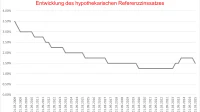
The reference interest rate is an indicator of mortgage interest rates in Switzerland. It is used as a basis for calculating rents. If the reference interest rate drops, tenants are generally entitled to a rent reduction.

Are my ancillary costs set to go up?
Ancillary costs include all of your energy bills. Due to the recent increases in energy prices, ancillary costs are also set to go up by quite a significant amount. Hence, we would recommend setting aside some money or increasing your regular payments to avoid any unpleasant surprises.